

We often assume that "information" refers to words written in a book—the more words, the more information. But computer scientist Claude Shannon taught us that information is actually "Surprise." If I tell you something you already know (e.g., "The sun rises in the east"), the amount of information in that sentence is effectively zero.
To teach children this abstract concept, and how computers use it to compress data or make Decisions, we don't need advanced calculus. We just need a classic game: "20 Questions."
Phase 1: Experiencing Frustration (The "Bad" Strategy)
Before teaching "Binary Search," let the child experience the pain of having "No Strategy."
1. Game Setup:
- The teacher thinks of a number between 1 and 100 (let's say 86).
- The child guesses, but can only ask "Yes/No" questions.
2. Observation & Listening (Crucial Moment):
- Many children will intuitively ask: "Is it 1?" "Is it 2?"
- ❌ Don't interrupt. Patiently answer "No," "No."
- Wait until the 5th or 10th question when they start getting impatient. This is the perfect teachable moment.
3. Constructive Inquiry:
- Teacher: "Do you feel that guessing one by one is tiring? If you're unlucky and the answer is 99, how many times do you have to guess?"
- Child"99 times..."
- Teacher"What if we turned this into a contest wherethe person who asks the fewest questions wins?Or, imagine every question costs you $10. Would you want to change your strategy?"
Phase 2: Discovering Binary Search
Guide the child to think about how to "eliminate" the maximum number of wrong answers.
✅ Effective Scaffolding Dialogue:
- Teacher: "Is there a kind of question that, by asking just once, allows you to throw half of the numbers into the trash bin—like slicing a watermelon in half?"
- (Give them time to think or draw diagrams.)
- Child"Is it bigger than 50?"
- Teacher: "Brilliant! If I say 'Yes,' what happens to the pile of numbers from 1 to 50?"
- Child: "We don't need to guess them anymore!"
- Teacher: "Exactly! You just spent $10 (one question) to filter out 50 numbers. Isn't that much better value than asking 'Is it 1?'"
Activity Implementation:
Let the child play the number guessing game again using this new strategy (Greater/Less than). Guide them to discover that no matter what the number is (1-100), they can always find it within 7 guesses
Phase 3: Drawing the Decision Tree
Step 1: Visualization (Before handing out the worksheet)
Before showing the diagram full of arrows, keep the momentum going.
- Teacher: "When we played just now, what was happening inside your brain? Can you draw your 'Thinking Path' for others to see? Let's try a smaller range, 0 to 7. If your first question is 'Is it ≥4 ?', where do you go next?"
- (Let them scribble on blank paper. The point is to make them realize that thinking involves branching.)
Step 2: Decoding the Map (Exploring the Worksheet)
Now, bring out the diagram. Tell them: "This is a 'Thinking Map' drawn by computer scientists. Let's see if it matches yours."
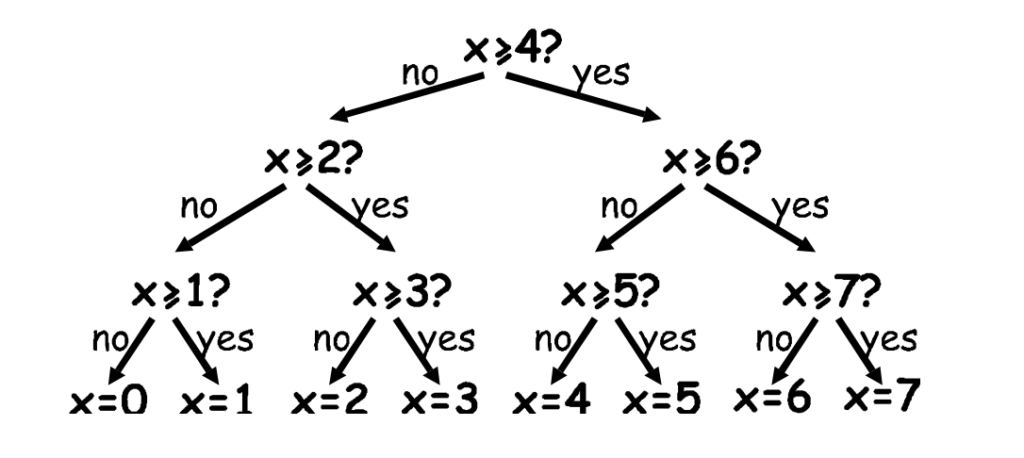
1. Task: Path Tracing
- Scenario"We are looking for the number 5. Put your finger on the start node at the top. Let's walk the path."
- First Check: x≥4? Is 5 greater than or equal to 4? → Child: "Yes!" → Teacher: "Okay, let's go down the 'Yes' path."
- Second Check: Now at x≥6?. Is 5 greater than or equal to 6? → Child: "No!" → Teacher: "Okay, let's take the 'No' path."
- Third Check: x≥5? Is 5 greater than or equal to 5? → Child: "Yes!" → Teacher: "Go 'Yes.' Look! Did we find 5?"
2. The Constructivist Hook
- Teacher: "How many decisions did you have to make to find 5?"
- (Guide them to notice that finding any number in this range requires exactly 3 decisions).
Step 3: The Secret of Binary (The "Aha!" Moment)
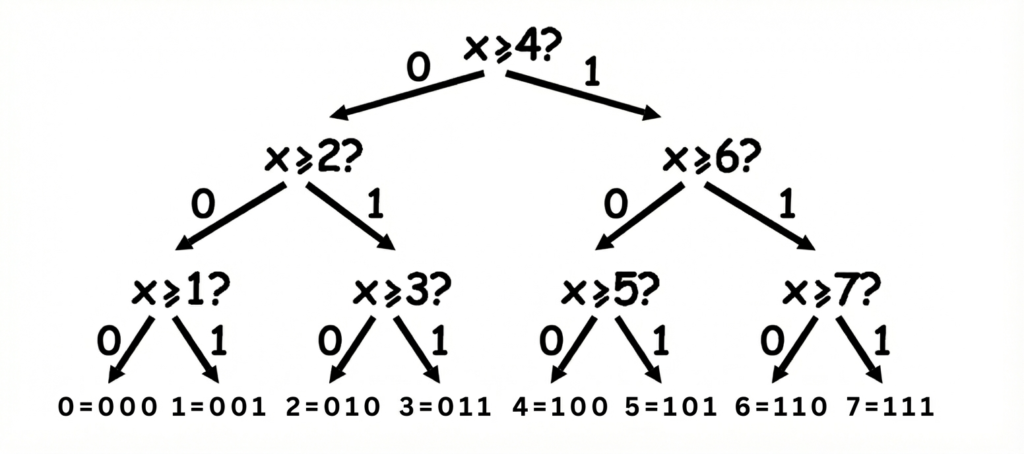
This is the most brilliant part of the map: The Path IS the Code.
1. Observing the Rule:
- Teacher: "What if 'No = 0' and 'Yes = 1'? Let's look back at the path we took to find 5."
- BacktrackingGuiding Reflection:
- Step 1: Yes (Write down 1)
- Step 2: No (Write down 0)
- Step 3: Yes (Write down 1)
- Teacher:"String these three numbers together. What do you get?"
- Child:「1… 0… 1?」
- Teacher: "Do you remember the binary cards? What is the binary code for 5?"
- Child(Surprised) : "It's also 101!"
2. Verification & Consolidation:
- Teacher: "Is that a coincidence? I don't believe it. Pick another number (e.g., 3), walk the map, write down the path as 0s and 1s, and check if it matches its binary code."
- (Let them verify it themselves. When they see every number matches, they grasp the essence: Binary is simply a record of a series of Yes/No decisions.)
Phase 4: What is Information? (Surprise = Information)
Understanding Shannon's Information Theory via the "Nonsense Test."
Scenario Dialogue:
- Teacher: "Let's play a game to see who can say the most 'boring' sentence (least information)."
- Example A: Mom says, "I walked on my feet to work today."
- Example B: Mom says, "I took a UFO to work today."
- Teacher: "Which sentence makes your jaw drop?"
- Child: "The UFO one!"
- Teacher: "Right. You already knew the first one, so it has zero new information for you. The second one is completely unexpected, so the amount of information is huge."
Connecting back to Number Guessing:
- Teacher: "Back to the game. If the number is between 1 and 100, it's hard to guess, so the answer carries a lot of information (you need 7 questions)."
- Teacher: "But if I say the number is between 1 and 2. How many questions do you need?"
- Child: "Just one!"
- Teacher: "Because it's not surprising and easy to guess, the information amount is small. This is Shannon's secret: The harder it is to guess, the more information it holds, and the more space (bits) the computer needs to store it."
Phase 5: Application & Summary
Why does this matter?
- Teacher: "Do you know how 'Autocorrect' on your phone works? When you type 'Good,' the phone has a Decision Tree in its mind. It guesses there is a 90% chance the next word is 'Morning,' and only a 1% chance it is 'Pizza.' So it puts 'Morning' on the easiest branch to reach. That is computers using Probability and Decision Trees to save you time."
Teaching Observation Checklist
| Observation Point | Less Effective Reaction | More Effective Scaffolding |
| When the child insists on linear guessing (1, 2, 3...) | "That's too slow. Use Binary Search." (Giving the Algorithm) | "Do you want to try a question that can delete half the numbers at once?" |
| Explaining the Tree Diagram | "This is a Decision Tree. Memorize it." | "Can you draw how your brain was thinking just now? If the answer is YES, which way do your thoughts go? What if it's NO?" |
| Explaining Information (Entropy) | "Information is Entropy. The formula is..." | "If I tell you 'The sun is hot,' how much is that sentence worth? If I tell you 'Tomorrow's lottery numbers,' how much is that worth? Why?" |
Summary
Through this unit, children learn more than just "guessing tricks." They learn:
- Algorithmic Efficiency: The massive difference between Linear Search (guessing one by one) vs. Binary Search (halving).
- Data Structures: How to use a Tree to organize logic.
- The Essence of Information: Information is a tool used to "eliminate uncertainty."
Next time the child plays "20 Questions," try praising them: "Wow! That question was powerful. You just killed thousands of wrong answers in one shot. Your question had a huge amount of information!"