

Imagine you are participating in a thrilling pirate treasure hunt. Your goal is to find the legendary "Treasure Island." But there is a huge problem: you don't have a map.
In Computer Science, when we don't know exactly how a system is supposed to work, we often draw a specific type of diagram to help us think. Today, we are going to take children from a "stumbling in the dark" adventure to mastering a powerful tool in Computer Science—the Finite State Machine (FSM).
Phase 1: The Fear of Getting Lost
First, let the children experience the dilemma of having "no map."
- Scenario Setup:
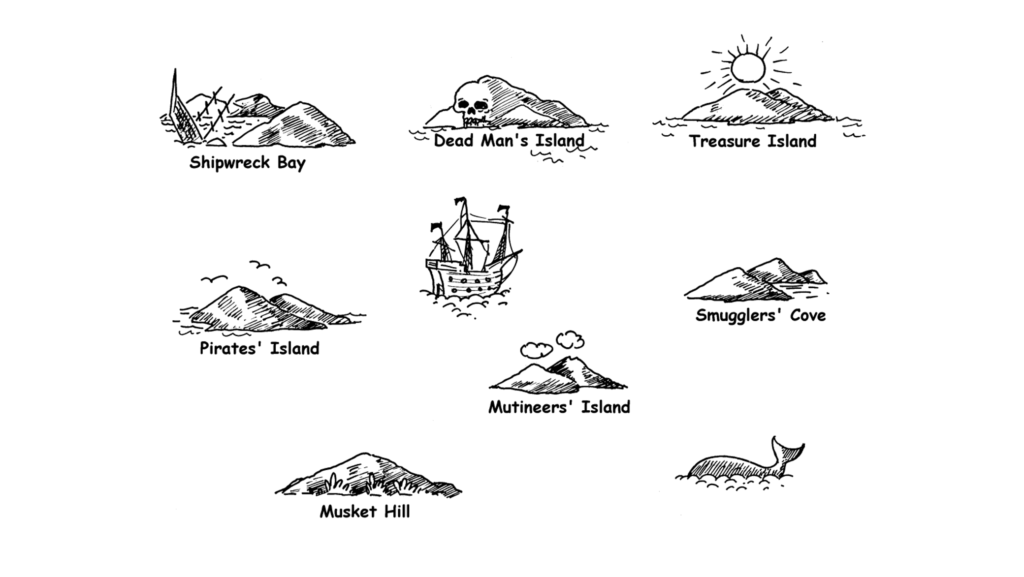
- Imagine there are seven islands controlled by pirates right in front of you.
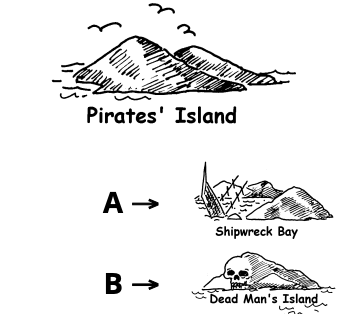
- You are standing on the first island. There are two ships docked in front of you: Ship A and Ship B.
- The Key Challenge:
- You have no nautical chart. You have absolutely no idea where these ships are going.
- You can only choose to hop on one of the ships.If you are lucky, you might get one step closer to the treasure.If you are unlucky, you might be shipped back to the starting point, or just sail in circles around the same island.
- Guide the Feeling:
- "If we just randomly hop on ships like this, doesn't it feel like walking through a maze? Are we going in circles without realizing it?"
- This is exactly the state of a computer without instructions—confused and ineffective.
Phase 2: Drawing Your Nautical Chart
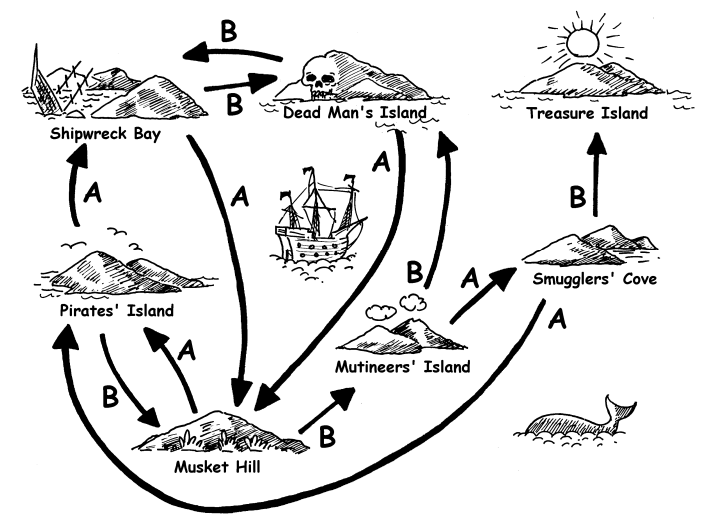
Since we are afraid of getting lost, let's draw a map by ourselves. This is the process of converting "experience" into "logic."
- Start Drawing:
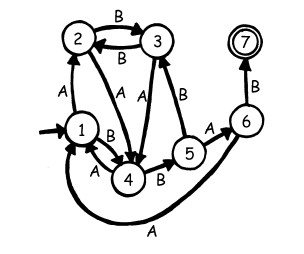
- Take out a piece of paper. Draw every island you arrive at as a "Circle" (Dot).
- Draw the Ship A or Ship B you took as an "Arrow" (Route) connecting the islands.
- Building the Model:
- When you draw this diagram, you are actually constructing a Computer Science model!
- Islands (Circles): Computer scientists call these "States."
- Taking a Ship (Arrows): This represents "Input Instructions" or "Transitions."
- The Whole Map: This is the "Finite State Machine (FSM)." It clearly defines what happens to the system under specific conditions (which island you are on) when receiving specific instructions (which ship you take).
Phase 3: Connecting to Daily Life (Concept Connection)
Turns out, a watch is just a Pirate Island
Now, let's apply this pirate map concept to a digital watch on a child's wrist (or the air conditioner remote at home). You will discover they are actually the same thing!
- Life Metaphor:
- Initial Island (State): The watch currently displays the "Current Time."
- Taking Ship A (Input): You press "Button A."
- Traveling to a New Island (Transition): The watch screen changes to "Stopwatch Mode."
- Continuous Operation:
- Taking Ship B: On the "Stopwatch Island," pressing "Button B" makes the watch start counting (State Change).
- Taking Ship A Again: If you press Button A one more time, you might jump to the "Alarm Settings" island.
- Back to Start: Keep pressing A, and eventually, you will find yourself back at the original "Time Display" island.
Phase 4: The Takeaway & Reflection
The User Manual IS Your Map
- Parent's Summary:"Look, the logic of operating this watch is exactly the same as the pirate islands! The 'Instruction Manual' that comes with electronic products is actually the 'Nautical Chart' we just drew."
- Thinking Challenge: "If there is an island (State) where you can never leave regardless of whether you take Ship A or Ship B (you stay at the same spot forever), in the pirate game, we call this a 'Dead End.' What do we call this in a computer or a watch?" (Answer: A Crash / Deadlock / Frozen Screen)
- Let's try drawing a State Diagram for Super Mario!
- Initial State: Small Mario.
- Input Instruction A (Eat Mushroom): Transforms into Big Mario (State Change).
- Input Instruction B (Hit a Turtle):
- If you hit a turtle on "Small Mario Island" $\rightarrow$ You die (Game Over).
- If you hit a turtle on "Big Mario Island" $\rightarrow$ Turn back into Small Mario (Injured but not dead).
- The Teaching Highlight: Let the child discover: Why is the result different even though the action was the same ("Hitting a Turtle")? Because your "State" at that moment was different!
Through hand-drawing the connections between islands, we learn how to simplify complex system behaviors into visual logical models. The Finite State Machine allows computer scientists to precisely design software interfaces and hardware control logic.
Reference :csunplugged finite state automata