

When computers transmit data, it’s a lot like passing notes in class. Sometimes the ink smudges, or the paper tears (Data Corruption). But magically, computers have a mechanism to "automatically spot the mistake" and even "automatically fix it."
This sounds abstract, but through this "Card Mind Reading" magic trick, children won't just learn the principle (Parity Error Correction); they will experience the thrill of being a magician.
Phase 1: The Magic Show (Shock Education)
Perform first before explaining any rules. This triggers immense curiosity.
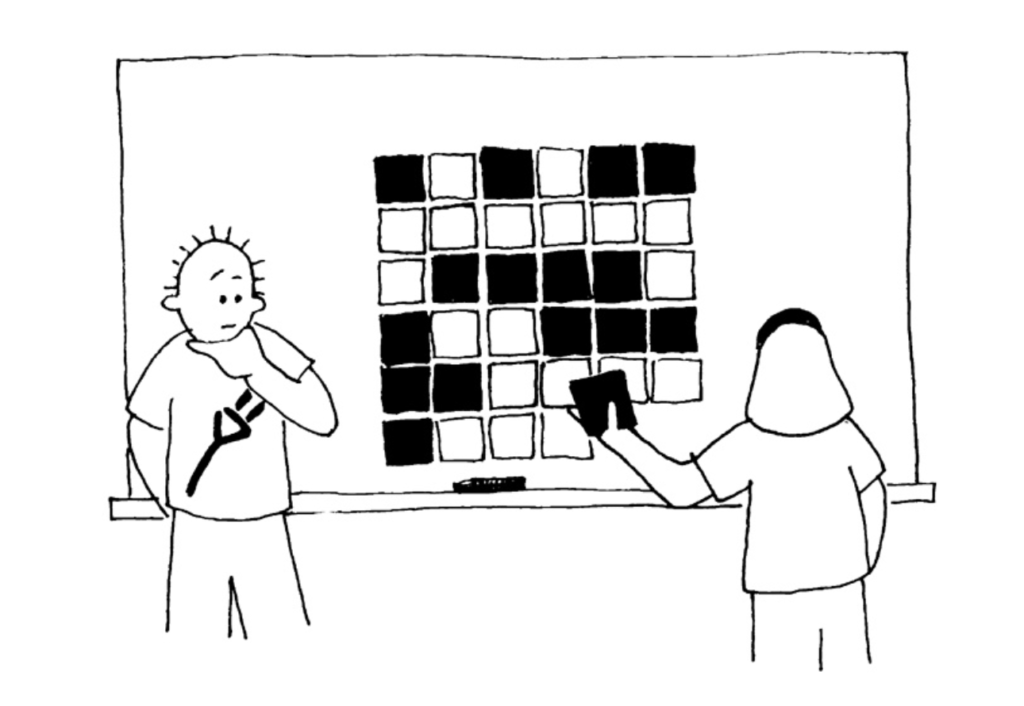
- Preparation: Ask the child to arrange a random 5x5 grid of cards (black and white sides).
- The Setup (Crucial Action): Tell the child: "I'm going to tidy up this messy pile of cards a bit." The Secret: Quickly add a 6th row and a 6th column (these are the Parity Bits). Ensure that every row and every column has an Even number of black cards.
- The PerformanceGuiding Reflection:
- Teacher: "I’m going to turn around and close my eyes. Please choose one card from these 36 cards and flip it over (white to black, or black to white)."
- (The child flips a card.)
- Teacher: (Turns back, pretends to scan the room, then points sharply at the flipped card.) "It’s this one, isn't it?"
Child's Reaction: "How did you know? Do you have a mirror? Is the card warm?"
(This is the Golden Moment of Constructivist teaching. Don't rush to give the answer. Listen to their wild guesses.)
Phase 2: The Investigation (De-mystification)
Invite the child to be the detective and crack your magic code.
✅ Constructivist Scaffolding (Finding the Pattern):
The Scenario: "I don't memorize what every card looks like, but I remember a specific 'Pattern Rule'. When you flipped the card, you broke that rule."
- Guided Observation: Point to the rows that haven't been messed up.
- Teacher: "Let's count. How many black cards are in the first row?"
- Child: "2."
- Teacher: "The second row?"
- Child: "4."
- Teacher: "The third?"
- Child: "0."
- Teacher: "What do you notice? What do these numbers (2, 4, 0) have in common?"
- The Aha! Moment: The child exclaims: "They are all Even numbers!"
- Verifying the Hypothesis:Guiding Reflection:
- Teacher: "Okay, now look at the row where you flipped the card. How many black cards are there now?"
- Child: "3... Ah! It became an Odd number!"
- Teacher: "Exactly! My eyes work like a scanner. I just look for 'Where did it become Odd?', and I know exactly where the problem is."
Phase 3: Student as the Computer (Handing Over Control)
Let the child be the magician. This consolidates their understanding of the algorithm.
- The Setup ChallengeGive the child a random 5x5 layout and ask them to add the "6th row" and "6th column."
- Inquiry: "If this row already has 3 black cards (Odd), should your 6th card be black or white to make the total Even?"
- (This is teaching them how to calculate the Parity Bit.)
- Execution: The teacher intentionally flips a card and challenges the child to find it.
- The child has to scan every row and column. This simulates the computer's CPU performing an error check cycle.
Phase 4: Connecting to Reality (Why do we need this?)
Connect the magic trick to Computer Science concepts.
✅ Constructivist Dialogue:
Teacher: "Do you think this game has anything to do with computers? Do computers do magic tricks?"
Child: "I don't know."
Teacher: "Imagine you are sending a photo to a friend on your phone. The signal flies through the sky like these cards. But sometimes, lightning interferes, or a part of the hard drive is broken—just like a naughty ghost sneaking in and flipping one card."
- Teacher: "If the computer didn't know this magic trick, what would happen to the photo?"
- (It might have noise, wrong colors, or not open at all.)
- Summary: "But because the computer understands this 'Even Number Magic' (Parity Check), it scans the photo upon arrival. If it sees a row that has become Odd, it says: 'Aha! Error found here!' and flips it back. That is why your photos usually arrive perfectly."
Teaching Observation & Questioning Guide
To assist parents/teachers in the dialogue, use this checklist:
| Scenario | Less Effective Reaction | More Effective Scaffolding |
| When the child sets up the board wrong (a row is still Odd) | "Wrong. This row has 3 black cards, so you need to add a black one." (Direct Correction) | "Wait, let me check if your 'Shield' (Setup) is built correctly... Hmm, this row looks suspicious. Do you think this row is safe (Even) yet?" |
| When the child can't find the flipped card | "Look, it's the card where the 3rd row and 4th column meet." | "Which rows look weird to you? (Row 3). Okay, keep your finger on Row 3. Now, what about the columns? Where do these two lines cross?" |
| Exploring Limitations | "If you flip two cards, I can't find it." | "If you flip two cards at once, can you trick my eyes? Try it. Why can't I find the exact spot when you flip two?" (Guiding them to discover that errors can cancel each other out). |
Key Concepts Summary (The Takeaway)
Through this activity, the child learns more than just a trick; they learn:
- Redundancy: Why add that extra row/column? It's the "extra cost" we pay to protect the data.
- Algorithm: The process of checking "Is every row even?" is a step-by-step algorithm for error detection.
- Error Correction: Not only knowing that there is an error, but using Coordinates (intersection of row and column) to precisely fix it.
Reference :csunplugged error-detection-and-correction